

Generative UI
Article
Generative UI for TaskGenAgent: Designing Interactive Support for Agile Task Management
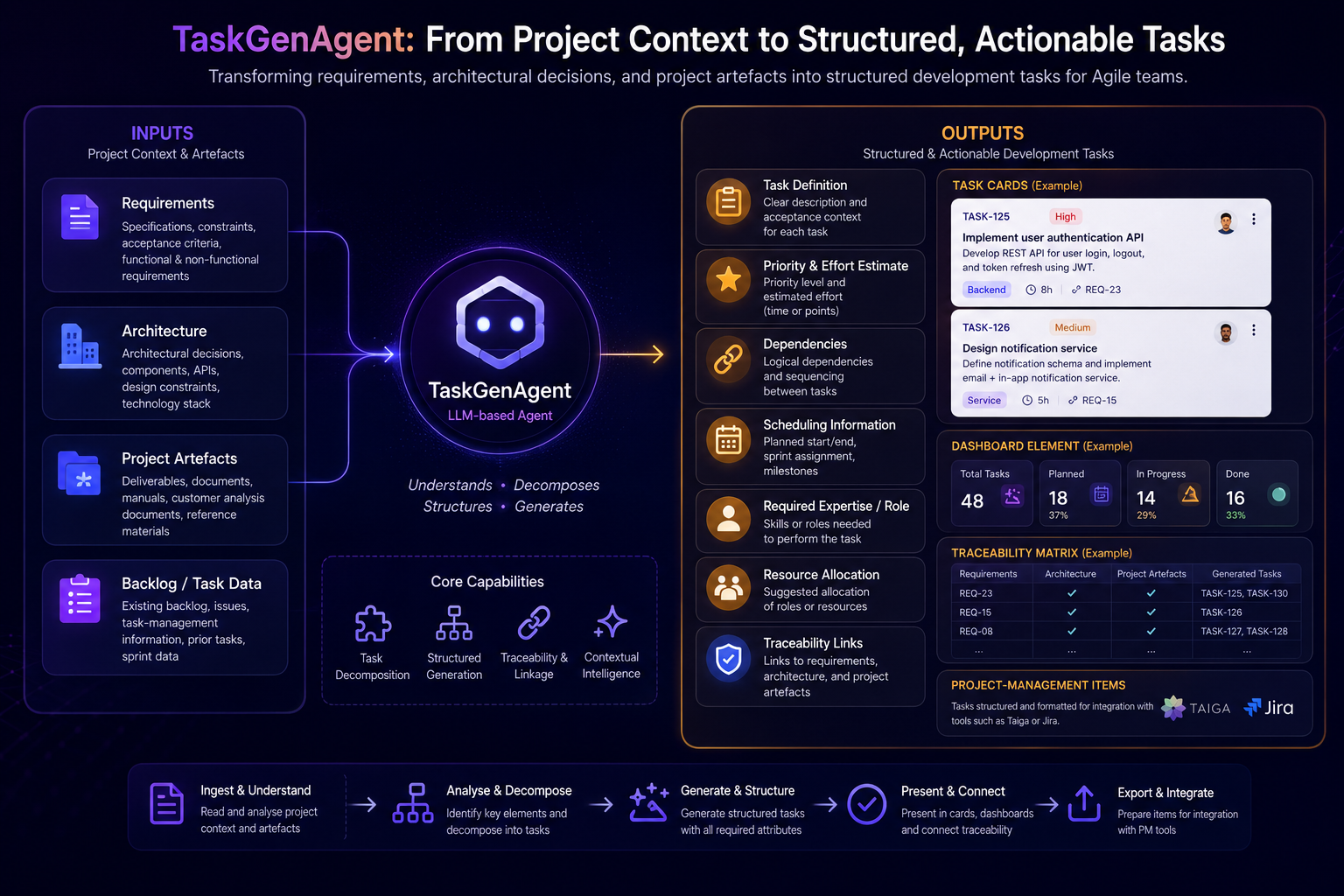
How LangChain’s Generative UI approach can support TaskGenAgent by turning generated software tasks into structured, interactive, and reviewable Agile task management artefacts.
TaskGenAgent is designed to support Agile task management by transforming software requirements, architectural decisions, and project artefacts into structured and actionable development tasks. However, for this type of agent, the quality of the interaction is as important as the quality of the generated content. A simple text response is often not enough when users need to inspect, review, refine, and trace generated tasks.
This is where Generative UI becomes especially relevant. LangChain’s Generative UI with React shows how agents can go beyond text responses and generate richer user interface components. Instead of presenting everything as plain chat output, the interface can adapt to the agent’s response and display structured elements such as cards, panels, forms, or dashboards. This makes the interaction more context-aware and suitable for complex workflows such as Agile task management.
For TaskGenAgent , this idea can be tailored to the specific needs of software task generation. The agent’s outputs could be represented as task cards, dashboard-style components, review panels, or project-management items. Each generated task could include information such as task title, description, priority, dependencies, estimated effort, required expertise, and traceability to the original requirement or architectural decision.
This type of interface is not just a visual improvement; it is an important part of making TaskGenAgent useful in practice. Agile task management involves continuous human review, prioritisation, planning, and refinement. Therefore, users should be able to understand not only what tasks TaskGenAgent generates, but also why they were generated and how they relate to the source artefacts.
A Generative UI-based design can support this by making TaskGenAgent outputs more transparent and actionable. For example, generated tasks can be displayed as structured cards, grouped by priority or development phase, linked to their source requirements, and prepared for later integration with project-management tools. This makes the agent more aligned with real Agile planning workflows.
In this sense, Generative UI is a necessary direction for TaskGenAgent . Since the agent is intended to support human-centred Agile task management, its outputs should be presented in a way that supports human understanding, feedback, and decision-making. By combining TaskGenAgent with a Generative UI approach, the interaction can move from simple text generation toward a more structured, traceable, and interactive task-planning experience.
Reference: LangChain Documentation – Generative UI with React
×